
iMedia Digital Signage1.2.3 - Google Play
You'll be able to see results in few seconds.
Publisher Description
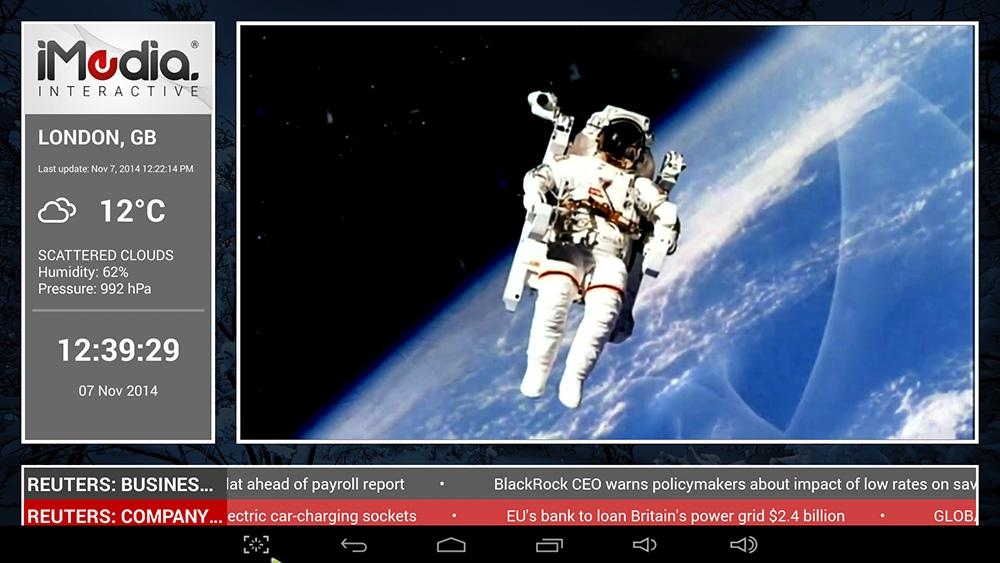
Create a straight forward and uncomplicated digital signage system and integrate with dynamic content such as, Live Streaming TV and ticker news feeds. This version also includes a trial period of Google mapping intended for licensed public display of real-time traffic congestion information typically for Hotel Receptions and Service Stations.
Here is what you can do:
Display two live news tickers from UK, US and German news providers
Display weather, time and temperature information for your area
Display a sequence of photos or videos stored on your SD card
Display a playlist of YouTube videos which seamlessly play by pre-buffering the next video.
Display a webpage with static or dynamic content
Run a radio station in the background from over 20,000 stations available
This app is a specialist app for licensed content, whilst most features are free you should email us and enquire about the display of licensed content in a public place.
This app was originally created for our own custom range of signage display units and runs as a launcher, this means that when the device boots up your service should start straight away in a maintenance-free site installation. But you can choose to have the app run conventionally and launch it manually from your apps tray.
Because we are a dynamic & specialist app developer we can customise the app for various licensed content and manage the licensing monthly or annually by in-app subscriptions or via monthly account invoicing.
We welcome bug reports or requests relating to customisation for specialist applications and content. Please do not hesitate to get in touch.
About iMedia Digital Signage
The company that develops iMedia Digital Signage is AEI Security & Communications Ltd. The latest version released by its developer is 1.2.3.
To install iMedia Digital Signage on your Android device, just click the green Continue To App button above to start the installation process. The app is listed on our website since 2016-01-14 and was downloaded 0 times. We have already checked if the download link is safe, however for your own protection we recommend that you scan the downloaded app with your antivirus. Your antivirus may detect the iMedia Digital Signage as malware as malware if the download link to com.aei.digitalsignage is broken.
How to install iMedia Digital Signage on your Android device:
- Click on the Continue To App button on our website. This will redirect you to Google Play.
- Once the iMedia Digital Signage is shown in the Google Play listing of your Android device, you can start its download and installation. Tap on the Install button located below the search bar and to the right of the app icon.
- A pop-up window with the permissions required by iMedia Digital Signage will be shown. Click on Accept to continue the process.
- iMedia Digital Signage will be downloaded onto your device, displaying a progress. Once the download completes, the installation will start and you'll get a notification after the installation is finished.
Program Details
System requirements
Download information
Pricing
Version History
version 1.2.3
posted on 2016-01-14
Disclaimer
Official Google Play Link
We do not host iMedia Digital Signage on our servers. We did not scan it for viruses, adware, spyware or other type of malware. This app is hosted by Google and passed their terms and conditions to be listed there. We recommend caution when installing it.
The Google Play link for iMedia Digital Signage is provided to you by apps112.com without any warranties, representations or guarantees of any kind, so access it at your own risk.
If you have questions regarding this particular app contact the publisher directly. For questions about the functionalities of apps112.com contact us.
